RAG介绍
检索增强生成(Retrieval-Augmented Generation)技术是一种结合了检索和生成两个阶段的自然语言处理技术,它由** Facebook AI**团队在 2020 年提出。通常包括两个阶段:检索阶段和生成阶段。在检索阶段,从知识库中找出与问题最相关的知识,为后续的答案生成提供素材。在生成阶段,RAG会将检索到的知识内容作为输入,与问题一起输入到语言模型中进行生成。这样,生成的答案不仅考虑了问题的语义信息,还考虑了相关私有数据的内容。解决了以下几个问题:
- 通过** Text2Vec** 检索的方式通过将生成的响应与现实世界的数据联系起来来减少幻觉。
- 大模型上下文长度有限,通过文本切片、知识检索,有效的将私域数据整合进大模型。
传统RAG流程与技术瓶颈
传统RAG核心流程如下:
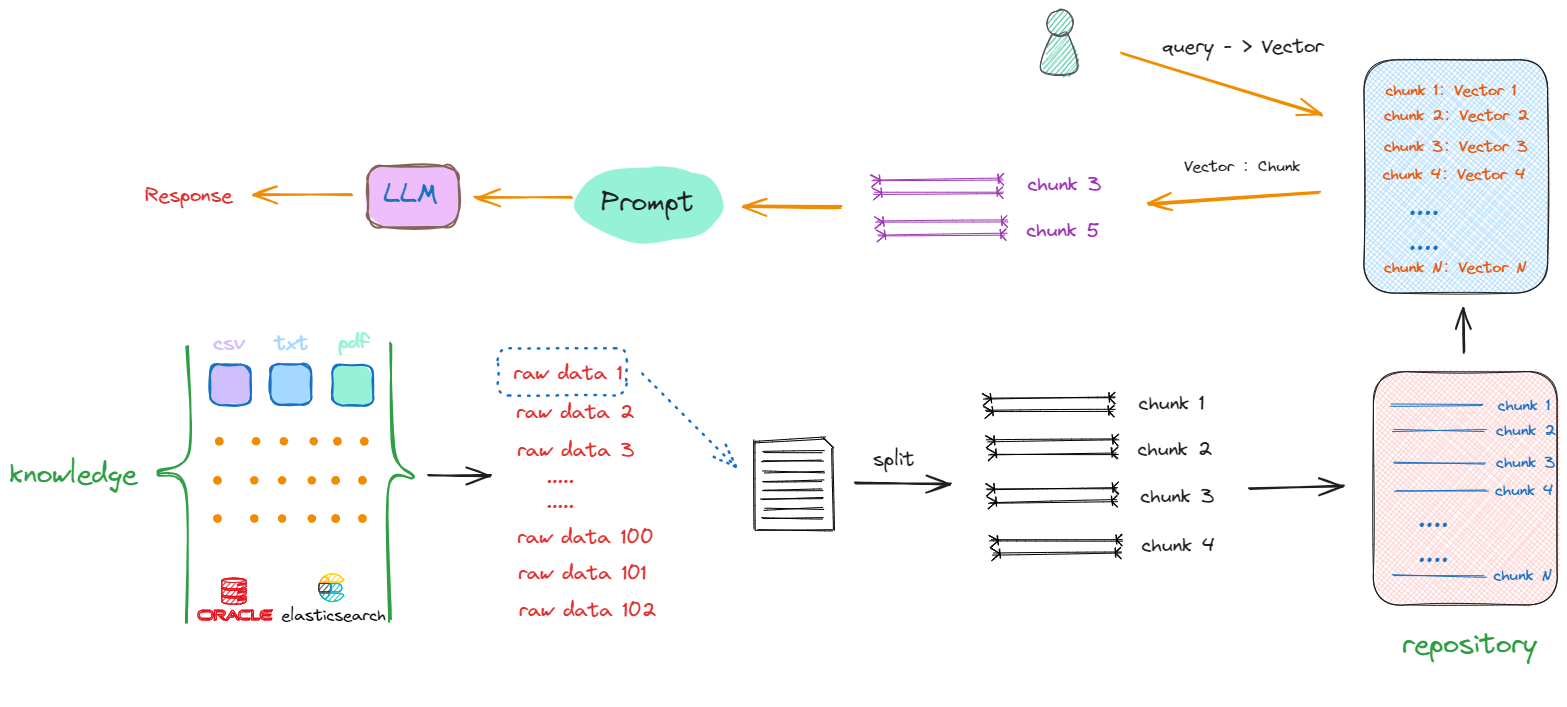
- 文档切分:根据关键字符切分、字符串长度、以及滑动窗口等等,围绕不同类型文本 ,可选择不同的切分策略。(优化手段:文本数据清洗等)
- 文档匹配与输入:使用Embedding模型进行文本词向量化处理,并使用余弦相似度召回和问题相关的文档。(优化手段:选择更好的Embedding模型;匹配后文本增强;重排序等等)
- 模型回答:将问题和召回的文本片段一起输入给大模型,生成最终的回复。(优化手段:后处理、用户意图判断等)
技术瓶颈包括以下两个方面:
- 传统RAG 很难将信息串联起来:当一个问题的答案需要通过多个不同的信息片段,并通过它们共享的属性来连接,进而提供新的综合见解时,传统RAG表现得很差。
例如,在回答类似“如何通过现有的数据推断出新结论”这种问题时,基线 RAG 无法很好地处理这些散布在不同文档中的相关信息,它可能会遗漏一些关键联系点。
- 传统 RAG 无法有效理解大型数据集或单一大文档的整体语义概念:当被要求在大量数据或复杂文档中进行总结、提炼和理解时,传统 RAG 往往表现不佳。
例如,如果问题要求对整个文档或多篇文档的主题进行总结和理解,传统 RAG 的简单向量检索方法可能无法处理文档间的复杂关系,导致对全局语义的理解不完整。
GraphRAG介绍
项目简介
项目地址:https://github.com/microsoft/graphrag
论文地址:https://arxiv.org/pdf/2404.16130
论文标题: From Local to Global: A Graph RAG Approach to Query-Focused Summarization
2024年2月微软研究院正式提出一种基于知识图谱的RAG方法——GraphRAG,这种新方法利用LLM基于私人数据集创建知识图谱。
研究动机主要包括两点:
- 当前的RAG是为了解决那些能够在文本片段中找到答案的问答任务而设计的,对于QFS (query focus summarization,使用自然语言对内容进行概括而非单纯地生成文本片段)任务不一定适用。
- 对于那些针对整个数据集进行提问的场景 (如:“这个数据集主要讲了哪些主要内容?”),原有的RAG方法显然无法将所有数据放入上下文中并让大模型总结;即便能放入上下文窗口,由于lost in the middle (另一篇探索上下文信息丢失的论文)现象的存在,LLM总结效果不一定好。
主要有以下几个特性:
- 基于图的检索:传统的 RAG 方法使用向量相似性进行检索,而 GraphRAG 引入了知识图谱来捕捉实体、关系及其他重要元数据,从而更有效地进行推理。
- 层次聚类:GraphRAG 使用 Leiden 技术进行层次聚类,将实体及其关系进行组织,提供更丰富的上下文信息来处理复杂的查询。
- 多模式查询:支持多种查询模式:
- 全局搜索:通过利用社区总结来进行全局性推理。
- 局部搜索:通过扩展相关实体的邻居和关联概念来进行具体实体的推理。
- DRIFT 搜索:结合局部搜索和社区信息,提供更准确和相关的答案。
- Prompt 调优:提供调优工具,帮助根据特定数据和需求调整查询提示,从而提高结果质量。
构建流程
GraphRAG过程主要涉及两个主要阶段:索引和查询,整体流程如下图所示:
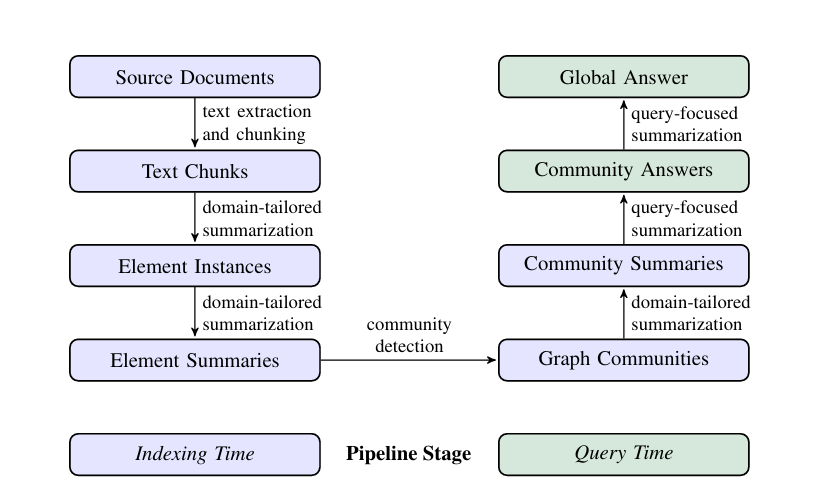
索引(Indexing)过程
Step 1. 文本切分(Text Unit Splitting)
- GraphRAG 需要处理的是一大篇文档或语料库。首先,它会将这些文档切分为 Text Units(文本单元),这些 Text Units 是对输入文档的细分,通常是按照段落、句子或固定长度的文本块来进行切分。
- 这样做的目的是为了便于对文本内容进行分析,尤其是当需要进行 实体识别 和 关系抽取 时,能够精准地关联到文档中的具体上下文。
Step 2. 实体识别(Entity Extraction)
- 在文本切分之后,GraphRAG 会使用 大模型(如 OpenAI GPT 或其他 LLM) 对每个 Text Unit 进行处理,提取其中的 实体。这些实体通常是指文档中出现的人物、地点、组织、概念等信息。
- 实体识别的目的是构建 实体图谱(Entity Graph),将所有实体提取出来并为后续的关系挖掘和查询做准备。
Step 3. 关系挖掘(Relationship Extraction)
- 关系挖掘是从文本中识别出实体之间的 关系,例如:谁与谁有关联、某个实体与另一个实体之间的关系是“属于”、“合作”、“对立”等。
- 通过这种关系提取,GraphRAG 可以构建 关系图谱(Relationship Graph),这些关系将有助于后续的 查询引擎 理解和推理。
Step 4. 文本嵌入(Text Embedding)
- 在识别了文本中的实体和关系之后,GraphRAG 会利用 Embedding 模型将文本和实体表示为向量(vectors)。这些向量不仅包括了文本的语义信息,还能为后续的检索和查询提供高效的表示。
- 这些嵌入向量将存储在 向量数据库(如 LanceDB)中,为查询时提供快速的相似度搜索。
Step 5. 构建社区和层级结构(Community and Hierarchical Clustering)
- 通过使用 图谱聚类算法(如 Leiden 算法),GraphRAG 会将不同的实体和关系分组,形成多个 社区(Community)。这些社区是根据实体之间的相似度或关系的密切程度进行划分的。
- 这种分组帮助 GraphRAG 更好地理解不同知识领域的结构,为查询时提供更具层次性的上下文信息。
Step 6. 生成索引文件(Indexing)
- 完成上述步骤后,所有的 实体、关系、社区报告、文本单元等信息都会存储在磁盘上的 Parquet 文件中。
- 这些索引文件实际上就是构建好的 知识图谱,包括了文本内容、文本中涉及的实体和关系的结构化表示,并且这些文件是为后续的查询引擎和推理过程提供基础。
查询(Query)过程
索引完成后,用户可以通过不同的搜索模式进行查询:
- 全局搜索:当我们想了解整个语料库或数据集的整体概况时,GraphRAG 可以利用 社区总结 来快速推理和获取信息。这种方式适用于大范围问题,如某个主题的总体理解。
- 局部搜索:如果问题关注于某个特定的实体,GraphRAG 会向该实体的 邻居(即相关实体)扩展搜索,以获得更详细和精准的答案。
- DRIFT 搜索:这是对局部搜索的增强,除了获取邻居和相关概念,还引入了 社区信息 的上下文,从而提供更深入的推理和连接。
Prompt 调优
为了获得最佳性能,GraphRAG 强烈建议进行 Prompt 调优,确保模型可以根据你的特定数据和查询需求进行优化,从而提供更准确和相关的答案。
案例演示
构建索引
下面通过实际案例演示上述过程:
(1)GraphRAG安装
require python==3.12
pip install graphrag==0.5.0
(2)建立知识库存储目录
!mkdir -p ./ragtest4/input/
ragtest4命名随意,input名称需固定,目录建立完成,将知识文档上传到该目录,这里通过《红楼梦》的前两回内容进行演示:
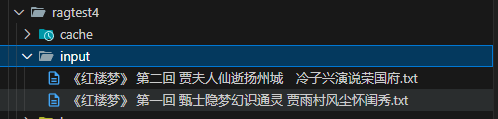
(3)GraphRAG初始化,通过命令行执行以下命令
graphrag init --root ./ragtest4
(4)执行完成。生成prompts文件夹,.env文件和setting.yaml文件。
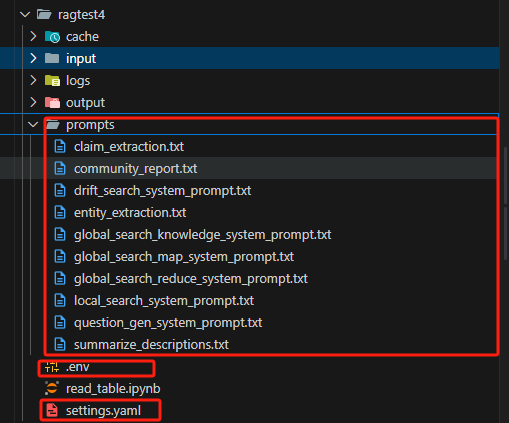
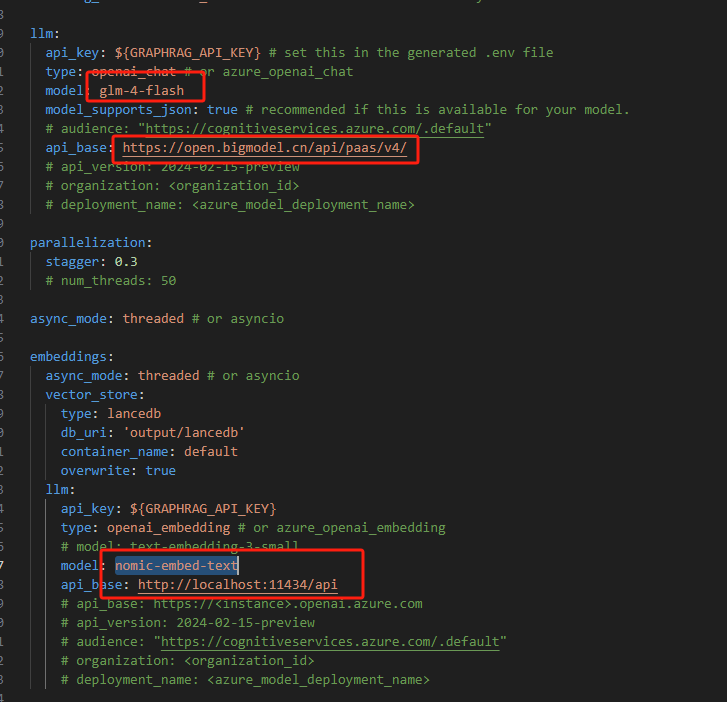
(5)修改.env文件和setting.yaml配置文件。
通过修改上述两个文件配置大模型和Embedding模型,演示使用的是GLM4-flash大模型+Ollama nomic-embed-text Embedding模型。
- .env文件配置GLM4的API-key

- setting.yaml配置如下:
(6)prompts文件夹内为GraphRAG预定义prompt,用来提取实体、关系、生成社区报告等等。全英文,可参考以下项目,替换成中文。https://github.com/HolyFishhh/graphrag_zh_prompts
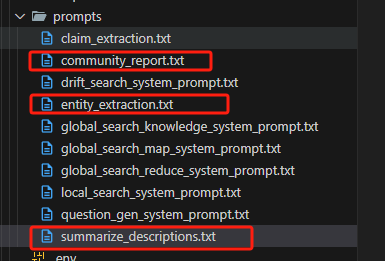
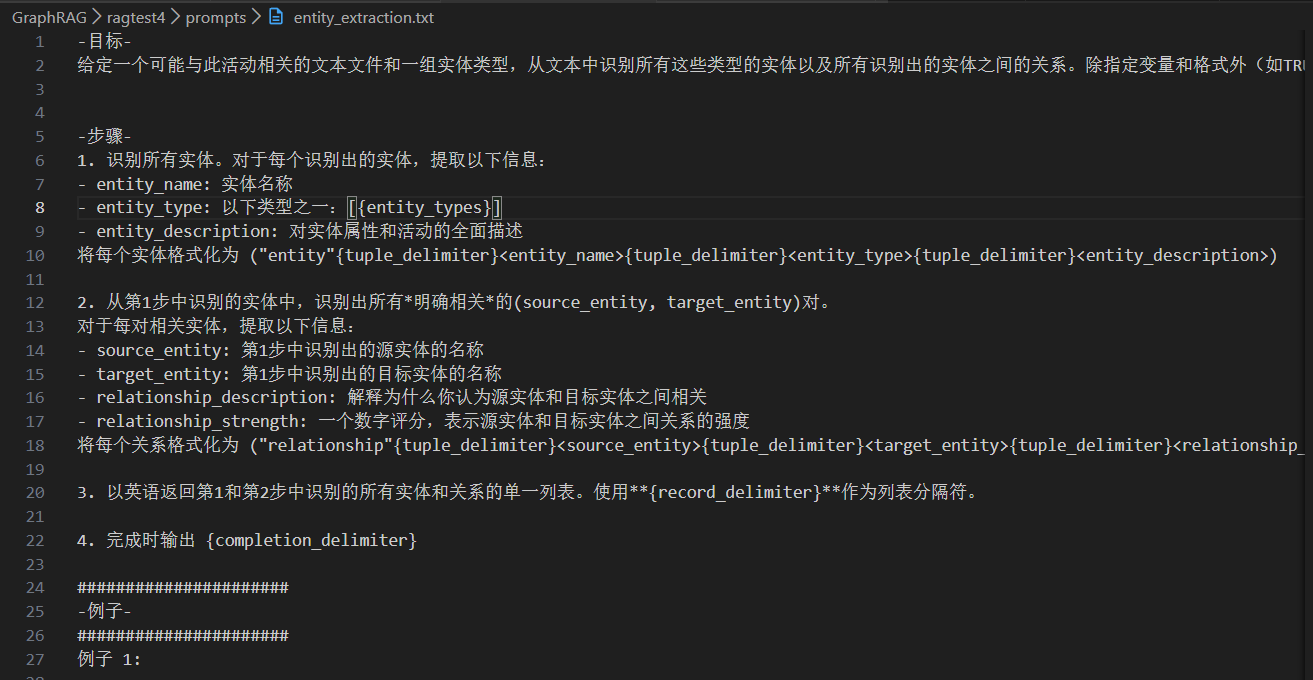
- entity_extraction: 用于从自然语言文本抽取实体与关系。
- summarize_descriptions: 用于生成实体与关系的描述性文本。
- community_report: 用于生成社区的摘要等报告信息。
- claim_extraction: 这是一个可选动作,用来生成一些实体的辅助声明 (由 GRAPHRAG_CLAIM_EXTRACTION_ENABLED 参数控制),这里忽略。
示例:****entity_extraction.txt
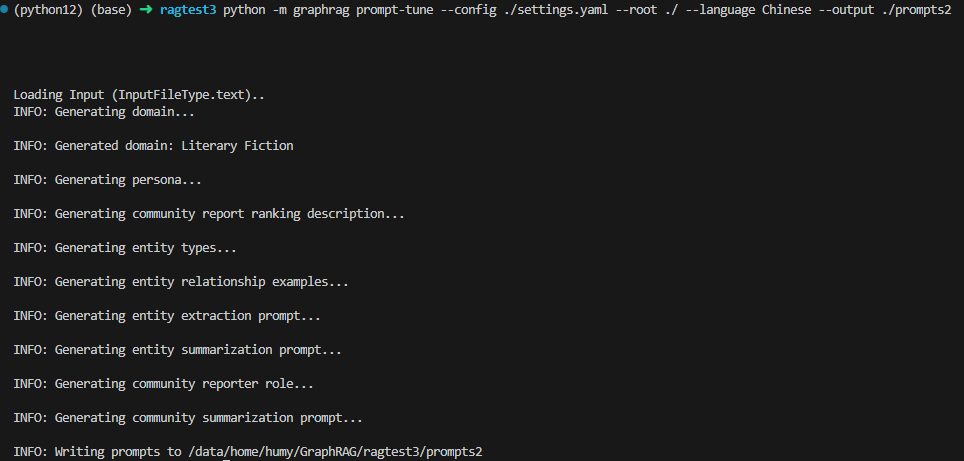
(7)GraphRAG提供了prompt优化指令,可将预设的prompt中shot替换成跟文档内容相关的shot(可选,本案例未采用)
python -m graphrag prompt-tune --config ./settings.yaml --root ./ --language Chinese --output ./prompts2
(8)构建索引
graphrag index --root ./ragtest4
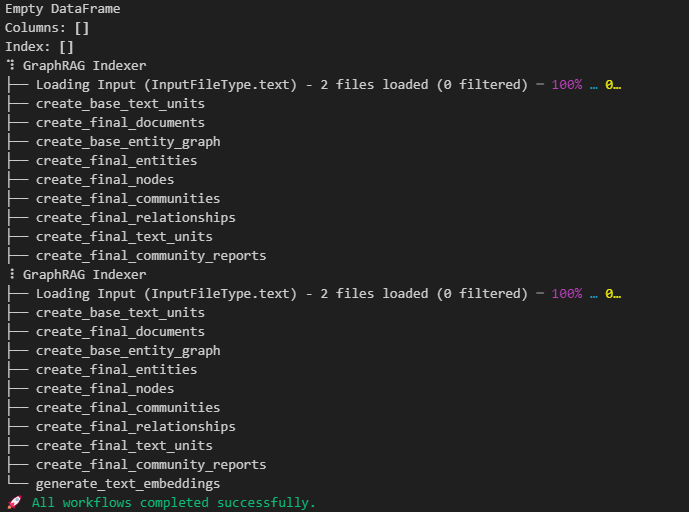
出现以上提示,说明构建成功。12000字,大概构建了4分钟。构建成功后,各知识图谱相关数据集都保存在output文件夹中:
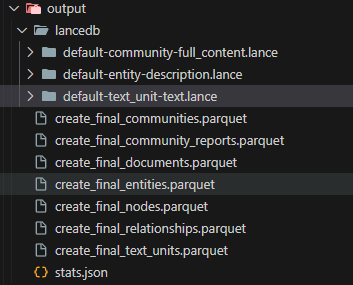
包含:
- 实体表(Nodes Table)
- 文件名:
create_final_nodes.parquet - 内容:知识图谱中的实体节点(例如:人、地点、组织)。
- 包含信息:
- 实体的名称(如 “John Doe”)。
- 实体的类别(如 “PERSON”, “ORGANIZATION”, “LOCATION”)。
- 与社区相关的信息(如实体所属的社区)。
- 实体的度数(degree),表示该实体在图谱中的连接数。
- 文件名:
- 关系表(Relationships Table)
- 文件名:
create_final_relationships.parquet - 内容:知识图谱中实体之间的关系(即图谱的边)。
- 包含信息:
- 两个实体之间的关系描述(例如 “works for”, “lives in”)。
- 关系的强度(数值化,用于衡量关系的显著性或重要性)。
- 文件名:
- 嵌入向量表(Entity Embedding Table)
- 文件名:
create_final_entities.parquet - 内容:实体的语义嵌入,用于表示实体的语义信息。
- 用途:支持语义搜索(通过嵌入计算实体之间的相似性)。
- 文件名:
- 社区报告表(Community Reports Table)
- 文件名:
create_final_community_reports.parquet - 内容:社区的摘要信息。
- 用途:支持全局搜索(通过社区信息回答关于数据集整体的问题)。
- 文件名:
- 文本单元表(Text Units Table)
- 文件名:
create_final_text_units.parquet - 内容:被切分的原始文本单元(TextUnits)。
- 用途:将知识图谱和原始文本结合,为 LLM 提供上下文支持。
- 文件名:
- 社区表(Community Table)
- 文件名:
create_final_Communities.parquet - 内容:每个社区基本情况。
- 文件名:
- 文件表(Documents Table)
- 文件名:
create_final_documents.parquet - 内容:用于记录所有参与知识图谱构建的文件情况。
- 文件名:
结合实例解释一下每张表字段的含义:
(一)文件表 create_final_documents.parquet
documents_df = pd.read_parquet("./output/create_final_documents.parquet")
documents_df

create_final_documents.parquet保存文档内容,有个文档生成几行内容,每一行代表一个文档。
title: 文档标题text: 文档内容text unit ids: 文档包含的文本单元id列表
(二)文本单元表create_final_text_units.parquet
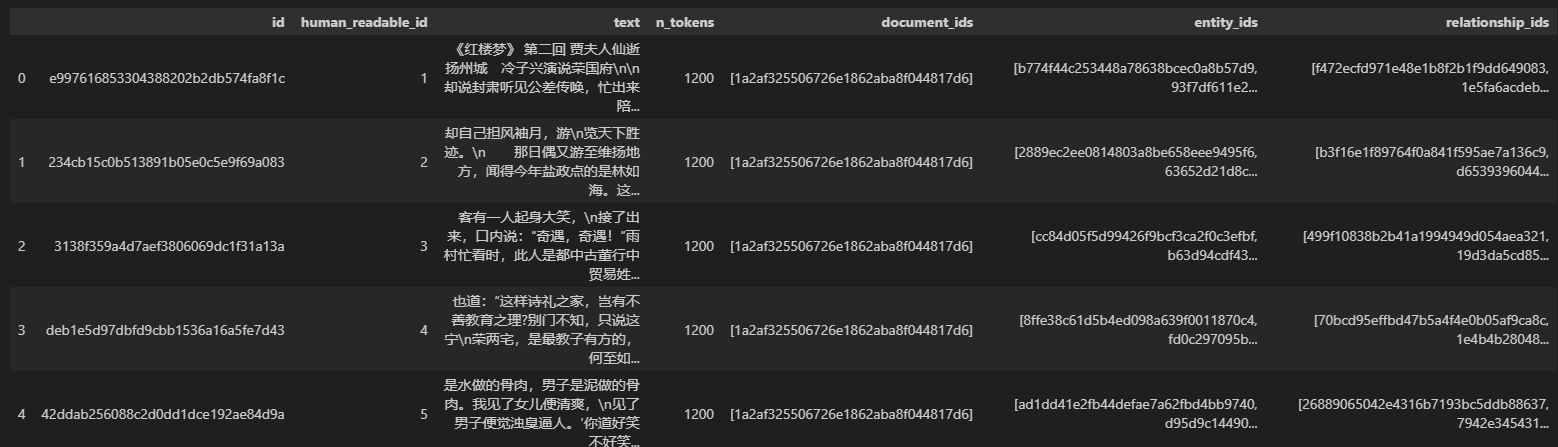
将所有文档内容进行切块,按照1200token进行切分。
text: 文本单元内容n_tokens: token数量document_ids: 所属文档identitys_ids: 文本单元包含的实体id列表relationship_ids: 文本单元包含的关系id列表
(三)实体嵌入表create_final_entities.parquet
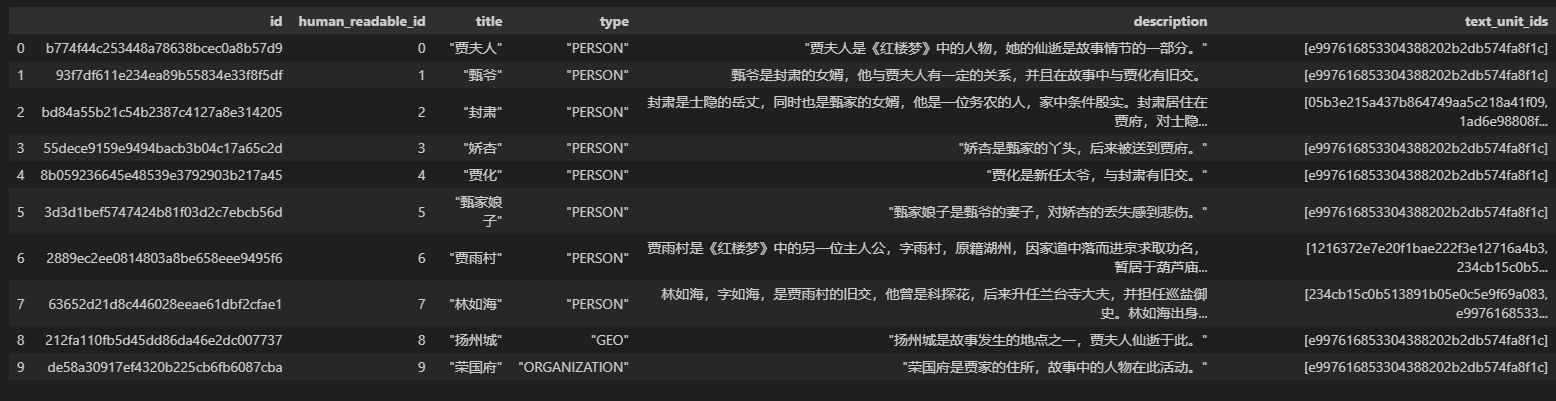
title: 实体名称type: 实体类型description: 实体描述
(四)实体表create_final_nodes.parquet
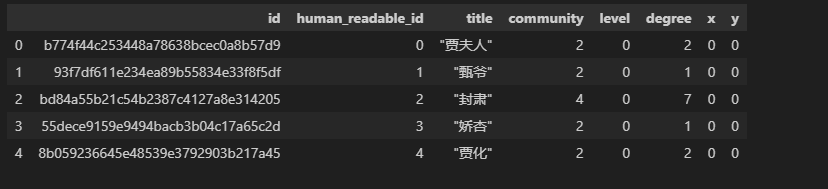
id: 每个实体的唯一标识符,可以是数字或字符串。human_readable_id: 人类可读的标识符,方便理解。title: 实体的标题或名称(如文本中的人物、书籍名等)。community: 实体所属的社区编号(我们假设所有实体目前都在社区-,后续聚类会更新)。level: 假设目前所有实体的层级为-,后续会根据聚类结果填充。degree: 假设实体之间的初步关系较少,因此度数比较低。
(五)关系表create_final_relationships.parquet
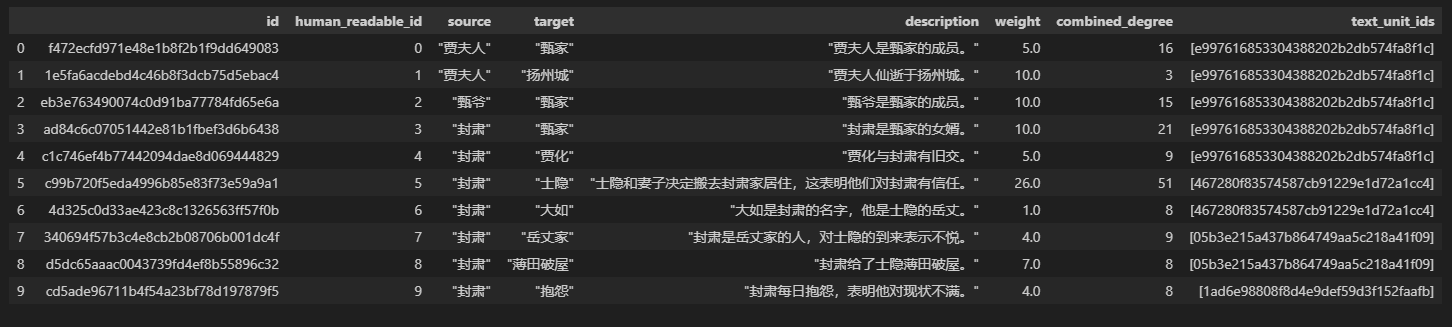
source:头实体。target:尾实体。description:关系的描述weight:两个实体之间的关系紧密程度,通过提示词进行打分combined_degree:两个实体度数相加
(六)社区表create_final_Communities.parquet
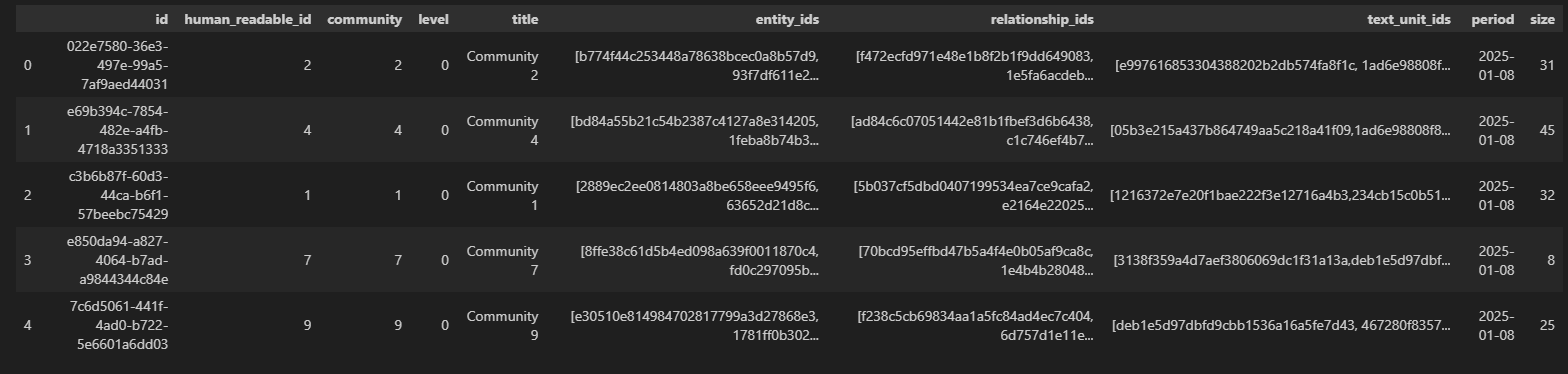
community:社区的编号,代表社区的分类或标识。level:社区层级,表示社区的聚类粒度。较低的值表示更抽象的层级,较高的值表示更具体的细分社区。title:社区的全称。entitys_ids: 社区包含的实体id列表relationship_ids: 社区包含的关系id列表text_unit_ids: 社区包含的文本单元id列表period:社区生成的时间戳。size:社区的大小,实体个数。
(七)社区报告表create_final_community_reports.parquet
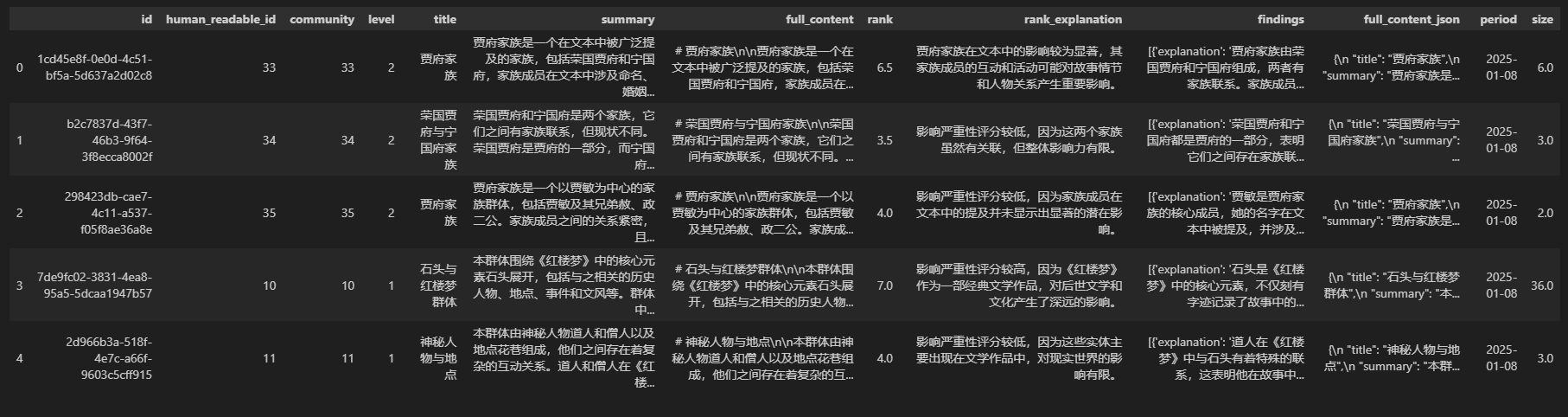
**id**:每个社区的唯一标识符(UUID)。**human_readable_id**:更容易理解的人类可读ID(数字化或短标识符)。**community**:社区的编号,代表社区的分类或标识。**level**:社区层级,表示社区的聚类粒度。较低的值表示更抽象的层级,较高的值表示更具体的细分社区。**title**:社区的标题,对该社区的简要描述,用于表示该社区的主题核心。**summary**:社区的摘要,对该社区内容的进一步扩展描述,解释其主题或涵盖的主要内容。**full_content**:社区报告的完整内容,包括更详细的信息,可能包含标题、摘要、重要发现等。**rank**:社区的排名或评分。可能用来表示社区的重要性、影响力或相关性。通过提示词进行打分。**rank_explanation**:对排名的解释。**findings**:社区的主要发现(JSON 格式),包含详细的解释或分析。**full_content_json**:社区完整内容的 JSON 表示。如果需要以结构化方式处理社区内容,这个字段是关键。**period**:报告生成的时间戳。**size**:社区的大小,实体个数。
查询
这里介绍两种查询模式:Local模式和Global模式
local search 的操作流程一般包含以下几个关键步骤:
- 用户提交一个查询,进行向量化,查找与用户问题相关的前K个实体,如果查找到结果,按照实体id取出对应实体。~~~~
- 构建与实体相关的上下文,包括:社区报告上下文、本地上下文(包括实体、关系)、文本单元上下文。
- 响应生成:将上述上下文和问题,传到预设的local_search_system_prompt 输入到大模型中,以产生最终的响应。
global search核心步骤可以分为2步:
- map阶段:构建一个包含所有社区报告full_content、社区title的上下文,并且切分为多个预设大小的chunk。针对用户输入问题,根据每一个chunk,都生成一个针对query的中间答案 (intermediate answer),同时模型需要对这个答案打分 (0-100),用于表示该答案对生成最终答案的帮助程度。0分答案直接过滤。这个过程没有用向量embedding来匹配,而是并发调用大模型来完成的。
- reduce阶段:对map中间响应的结果进行排序,然后放入LLM的上下文窗口,直至达到token限制。最后让LLM根据这些中间答案回答query,得到最终答案 (global answer)。
两种模式优缺点:
local模式:
- 高效性:由于只在局部范围内进行搜索,计算量相对较小,搜索速度较快。特别是对于大规模的图数据,Local Search 可以在较短的时间内找到一个较好的局部解。
- 局部最优性:虽然 Local Search 能够找到局部最优解,但不一定是全局最优解。这是因为它只考虑了局部的信息,没有对整个图进行全面的搜索。
- 对初始解敏感:搜索结果很大程度上取决于初始节点的选择。不同的初始节点可能会导致不同的局部最优解。
global模式:
- 全局最优性:能够找到全局最优解,保证了解的质量。对于一些对解的质量要求较高的问题,Global Search 是一种可靠的选择。
- 计算量大:由于要对整个图进行搜索,计算量通常较大,搜索时间较长。特别是对于非常大规模的图数据,Global Search 可能会变得非常耗时。
- 鲁棒性强:不受初始解的影响,能够对整个图进行全面的探索,找到最优解的可能性较大。
命令行形式:
graphrag query --root ./ragtest4 --method local --query "请介绍下贾母" #local模式
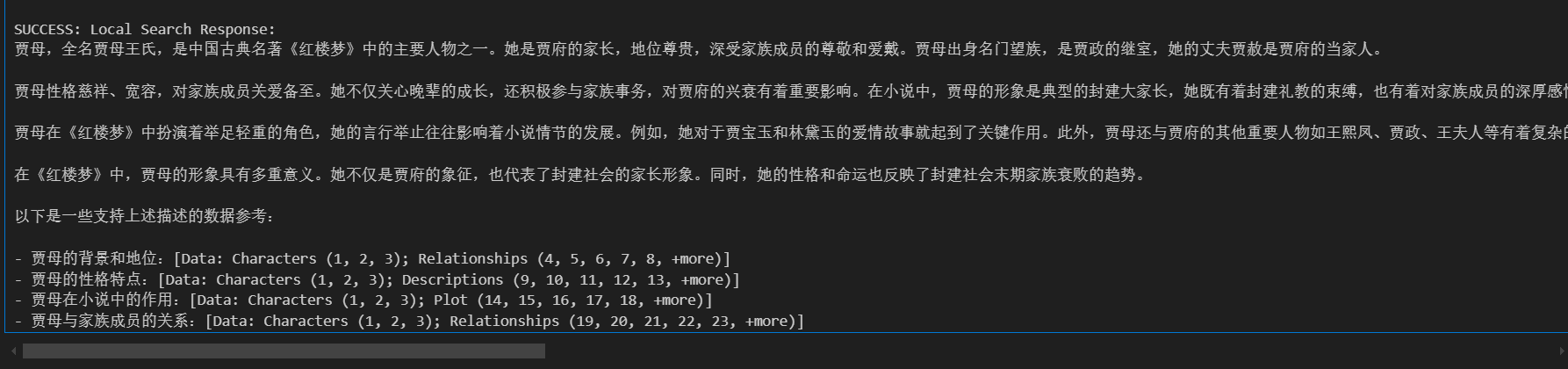
!graphrag query --root ./ragtest4 --method global --query "请介绍下贾母" # global模式

代码形式:
(1)local模式
import os
import pandas as pd
import tiktoken

from graphrag.query.context_builder.entity_extraction import EntityVectorStoreKey
from graphrag.query.indexer_adapters import (
read_indexer_entities,
read_indexer_relationships,
read_indexer_reports,
read_indexer_text_units,
)
from graphrag.query.input.loaders.dfs import (
store_entity_semantic_embeddings,
)
from graphrag.query.llm.oai.chat_openai import ChatOpenAI
from graphrag.query.llm.oai.embedding import OpenAIEmbedding
from graphrag.query.llm.oai.typing import OpenaiApiType
from graphrag.query.question_gen.local_gen import LocalQuestionGen
from graphrag.query.structured_search.local_search.mixed_context import (
LocalSearchMixedContext,
)
from graphrag.query.structured_search.local_search.search import LocalSearch
from graphrag.vector_stores.lancedb import LanceDBVectorStore
from IPython.display import Markdown, display

INPUT_DIR = "./ragtest4/output"
LANCEDB_URI = f"{INPUT_DIR}/lancedb"

COMMUNITY_REPORT_TABLE = "create_final_community_reports"
ENTITY_TABLE = "create_final_nodes"
ENTITY_EMBEDDING_TABLE = "create_final_entities"
RELATIONSHIP_TABLE = "create_final_relationships"
TEXT_UNIT_TABLE = "create_final_text_units"
COMMUNITY_LEVEL = 2

entity_df = pd.read_parquet(f"{INPUT_DIR}/{ENTITY_TABLE}.parquet")
entity_embedding_df = pd.read_parquet(f"{INPUT_DIR}/{ENTITY_EMBEDDING_TABLE}.parquet")

entities = read_indexer_entities(entity_df, entity_embedding_df, COMMUNITY_LEVEL)
description_embedding_store = LanceDBVectorStore(
    collection_name="default-entity-description",
)
description_embedding_store.connect(db_uri=LANCEDB_URI)
entity_description_embeddings = store_entity_semantic_embeddings(
    entities=entities, vectorstore=description_embedding_store
)

print(f"Entity count: {len(entity_df)}")


relationship_df = pd.read_parquet(f"{INPUT_DIR}/{RELATIONSHIP_TABLE}.parquet")
relationships = read_indexer_relationships(relationship_df)

print(f"Relationship count: {len(relationship_df)}")


report_df = pd.read_parquet(f"{INPUT_DIR}/{COMMUNITY_REPORT_TABLE}.parquet")
reports = read_indexer_reports(report_df, entity_df, COMMUNITY_LEVEL)
print(reports[0])
print(f"Report records: {len(report_df)}")


text_unit_df = pd.read_parquet(f"{INPUT_DIR}/{TEXT_UNIT_TABLE}.parquet")
text_units = read_indexer_text_units(text_unit_df)

print(f"Text unit records: {len(text_unit_df)}")


api_key = "**********************"
llm_model = "glm-4-flash"
embedding_model = "nomic-embed-text"

llm = ChatOpenAI(
    api_key=api_key,
    model=llm_model,
    api_base="https://open.bigmodel.cn/api/paas/v4/",
    api_type=OpenaiApiType.OpenAI,
    max_retries=20,
)

token_encoder = tiktoken.get_encoding("cl100k_base")

text_embedder = OpenAIEmbedding(
    api_key=api_key,
    api_base="http://localhost:11434/api",
    api_type=OpenaiApiType.OpenAI,
    model=embedding_model,
    max_retries=20,
)

context_builder = LocalSearchMixedContext(
    community_reports=reports,
    text_units=text_units,
    entities=entities,
    relationships=relationships,
    covariates=None,
    entity_text_embeddings=description_embedding_store,
    embedding_vectorstore_key=EntityVectorStoreKey.ID,
    text_embedder=text_embedder,
    token_encoder=token_encoder,
)

local_context_params = {
    "text_unit_prop": 0.5,
    "community_prop": 0.1,
    "conversation_history_max_turns": 5,
    "conversation_history_user_turns_only": True,
    "top_k_mapped_entities": 10,
    "top_k_relationships": 10,
    "include_entity_rank": True,
    "include_relationship_weight": True,
    "include_community_rank": True,
    "return_candidate_context": True,
    "embedding_vectorstore_key": EntityVectorStoreKey.ID,
    "max_tokens": 12_000,
}

llm_params = {
    "max_tokens": 2_000,
    "temperature": 0.0,
}

search_engine = LocalSearch(
    llm=llm,
    context_builder=context_builder,
    token_encoder=token_encoder,
    llm_params=llm_params,
    context_builder_params=local_context_params,
    response_type="multiple paragraphs",
)


result = await search_engine.asearch("贾府有多少人")
print(result.response)
# 很抱歉,您提供的数据表中没有包含关于贾府人数的具体信息。
# 因此,我无法根据现有数据回答贾府有多少人。
# 如果您能提供相关的数据或背景信息,我将很乐意帮助您分析。
(2) global模式
from graphrag.query.indexer_adapters import (
    read_indexer_communities,
    read_indexer_entities,
    read_indexer_reports,
)
from graphrag.query.llm.oai.chat_openai import ChatOpenAI
from graphrag.query.llm.oai.typing import OpenaiApiType
from graphrag.query.structured_search.global_search.community_context import (
    GlobalCommunityContext,
)
from graphrag.query.structured_search.global_search.search import GlobalSearch

COMMUNITY_TABLE = "create_final_communities"
COMMUNITY_REPORT_TABLE = "create_final_community_reports"
ENTITY_TABLE = "create_final_nodes"
ENTITY_EMBEDDING_TABLE = "create_final_entities"


community_df = pd.read_parquet(f"{INPUT_DIR}/{COMMUNITY_TABLE}.parquet")
entity_df = pd.read_parquet(f"{INPUT_DIR}/{ENTITY_TABLE}.parquet")
report_df = pd.read_parquet(f"{INPUT_DIR}/{COMMUNITY_REPORT_TABLE}.parquet")
entity_embedding_df = pd.read_parquet(f"{INPUT_DIR}/{ENTITY_EMBEDDING_TABLE}.parquet")

communities = read_indexer_communities(community_df, entity_df, report_df)
reports = read_indexer_reports(report_df, entity_df, COMMUNITY_LEVEL)
entities = read_indexer_entities(entity_df, entity_embedding_df, COMMUNITY_LEVEL)

context_builder = GlobalCommunityContext(
    community_reports=reports,
    communities=communities,
    entities=entities,
    token_encoder=token_encoder,
)


context_builder_params = {
    "use_community_summary": False,
    "shuffle_data": True,
    "include_community_rank": True,
    "min_community_rank": 0,
    "community_rank_name": "rank",
    "include_community_weight": True,
    "community_weight_name": "occurrence weight",
    "normalize_community_weight": True,
    "max_tokens": 12_000,
    "context_name": "Reports",
}

map_llm_params = {
    "max_tokens": 1000,
    "temperature": 0.0,
    "response_format": {"type": "json_object"},
}

reduce_llm_params = {
    "max_tokens": 2000,
    "temperature": 0.0,
}


search_engine = GlobalSearch(
    llm=llm,
    context_builder=context_builder,
    token_encoder=token_encoder,
    max_data_tokens=12_000,
    map_llm_params=map_llm_params,
    reduce_llm_params=reduce_llm_params,
    allow_general_knowledge=False,
    json_mode=True,
    context_builder_params=context_builder_params,
    concurrent_coroutines=32,
    response_type="multiple paragraphs",
)

result = await search_engine.asearch("贾府有多少人")
print(result.response)

# 贾府家族成员的人数众多,具体人数无法精确统计。根据不同分析师的报告,贾府家族成员至少有十几人,
# 也可能有数十人。这些成员包括贾政、王氏、贾珠、小姐、宁国公、贾代化、贾敬、惜春、贾珍、
# 贾蓉、贾雨村、甄士隐、林如海、黛玉等,以及贾化、贾琏、贾环、贾赦、贾敏等人。
# 家族成员之间的关系复杂,涉及父子、夫妻、兄弟姐妹、亲戚等,且可能涉及官位继承、
# 家族荣誉和家庭关系,因此具体人数可能更多
# [Data: Reports (12, 27, 7, 14, 21, 6, 13, 26, 3, 30, 18, 23, 29, 22, 34), (33, 31, 35, 28, 32)]。
print(
    f"LLM calls: {result.llm_calls}. Prompt tokens: {result.prompt_tokens}. Output tokens: {result.output_tokens}."
)

## LLM calls: 3. Prompt tokens: 25247. Output tokens: 1299.
GraphRAG总结
(1)GraphRAG与传统的基准RAG模型相比,在多个评价指标上都展现了明显的优势。
- Comprehensiveness 全面性:指的是回答的完整性,是否涵盖了问题的隐含上下文。GraphRAG不仅回答了问题的直接内容,还能从上下文中提取相关信息进行补充,提升回答的全面性。
- Diversity多样性:指的是回答中是否包含了不同的观点或角度。GraphRAG在多样性上的表现优于传统的RAG,能够提供更多元的视角,这对于复杂问题尤为重要。
- Empowerment 人类赋能(human enfranchisement):指的是是否提供了支持性源材料或其他上下文信息,这对于验证答案的准确性至关重要。GraphRAG在这方面能够提供更多的上下文支持,帮助用户理解回答的背景。
最后再具体介绍评估方式。
(2)GraphRAG索引的构建以及检索的开销较大(花费token数较多)。
LightRAG介绍
项目简介
项目地址:https://github.com/HKUDS/LightRAG
论文地址:https://arxiv.org/pdf/2410.05779
论文标题: LIGHTRAG: SIMPLE AND FAST RETRIEVAL-AUGMENTED GENERATION
2024年10月由香港大学和北京邮电大学团队提出,提出动机跟GraphRAG类似。
构建流程
整体流程如下:
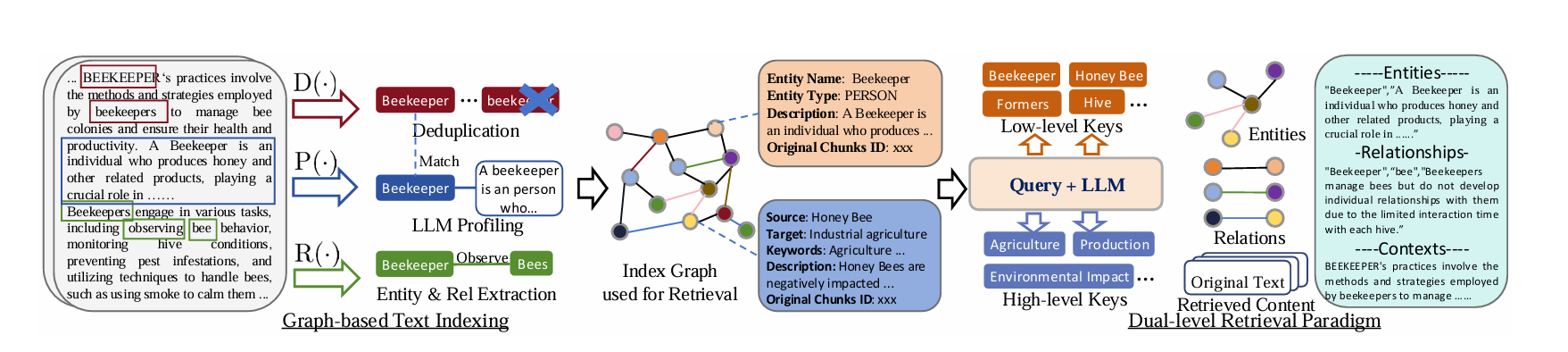
索引阶段:
- R: 利用 LLM 在文本数据中识别实体(节点)及其关系(边)。
- P: 构建键值对,每个索引键是一个单词或短语,能够实现高效检索,而相应的值是一个文本段落,总结来自外部数据的相关片段以辅助文本生成。
- D:从原始文本的不同段中识别并合并相同的实体和关系,去除重复实体和关系,减少不必要的计算,提升处理速度。
查询阶段:
双层检索:针对用户提的问题,提取high-level和low-level的关键词,支持5种检索模式
- naive:传统RAG流程,用户问题匹配chunk,然后一起输入大模型。
- local:从问题中提取low_level_keywords,high_level_keywords, 然后获取与low_level_keywords相关的实体上下文,关系上下文以及文本块上下文,一起输入大模型。
- global:从问题中提取low_level_keywords,high_level_keywords, 然后获取与high_level_keywords相关的实体上下文,关系上下文以及文本块上下文,一起输入大模型。
- hybrid: 从问题中提取low_level_keywords,high_level_keywords, 然后获取与low_level_keywords, high_level_keywords相关的实体上下文,关系上下文以及文本块上下文,一起输入大模型。
- mix: 结合上述所有上下文,跟用户问题一起输入给大模型。
案例演示
索引构建
import os
import asyncio
from lightrag import LightRAG, QueryParam
from lightrag.llm import openai_complete_if_cache, openai_embedding, ollama_embedding
from lightrag.utils import EmbeddingFunc
import numpy as np

WORKING_DIR = "./dickens"

if not os.path.exists(WORKING_DIR):
    os.mkdir(WORKING_DIR)


async def llm_model_func(
    prompt, system_prompt=None, history_messages=[], keyword_extraction=False, **kwargs
) -> str:
    return await openai_complete_if_cache(
        "glm-4-flash",
        prompt,
        system_prompt=system_prompt,
        history_messages=history_messages,
        api_key="**********************",
        base_url="https://open.bigmodel.cn/api/paas/v4/",
        **kwargs,
    )


async def embedding_func(texts: list[str]) -> np.ndarray:
    return await ollama_embedding(
        texts,
        embed_model="nomic-embed-text",
        host="http://localhost:11434",
    )


async def get_embedding_dim():
    test_text = ["This is a test sentence."]
    embedding = await embedding_func(test_text)
    # embedding_dim = embedding.shape[1]
    embedding_dim = len(embedding[0])
    print(f"Detected embedding dimension: {embedding_dim}")

    return embedding_dim


# function test
async def test_funcs():
    result = await llm_model_func("How are you?")
    print("llm_model_func: ", result)

    result = await embedding_func(["How are you?"])
    print("embedding_func: ", result)


# await test_funcs() # 测试llm+Embedding模型
# await get_embedding_dim()


embedding_dimension = await get_embedding_dim()
print(f"Detected embedding dimension: {embedding_dimension}")

rag = LightRAG(
    working_dir=WORKING_DIR,
    llm_model_func=llm_model_func,
    embedding_func=EmbeddingFunc(
        embedding_dim=embedding_dimension,
        max_token_size=8192,
        func=lambda texts: embedding_func(texts),
    ),
    addon_params = {"language": "Chinese"}
)

with open("./input/《红楼梦》 第一回 甄士隐梦幻识通灵 贾雨村风尘怀闺秀.txt", "r", encoding="utf-8") as f:
    text1 = f.read()
with open("./input/《红楼梦》 第二回 贾夫人仙逝扬州城 冷子兴演说荣国府.txt", "r", encoding="utf-8") as f:
    text2 = f.read()
all_text = [text1,text2]

await rag.ainsert(all_text)
构建完成,生成以向量库+知识图谱,如下图所示:
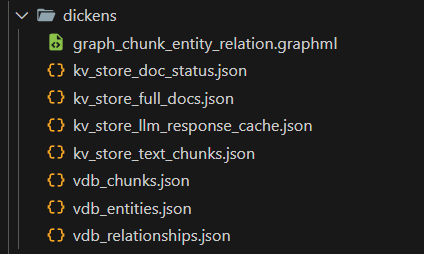
- graph_chunk_entity_relation.graphml:知识图谱数据
- vdb_chunks.json:文本块 (embedding)
- vdb_entities.json: 实体+实体描述 (embedding)
- vdb_relationships.json: 关键词+头实体+尾实体+关系描述 (embedding)
向量数据库:默认使用NanoVectorDBStorage
图数据库:默认使用NetworkXStorage
查询
from IPython.display import Markdown, display


# 五种查询模式
result = await rag.aquery("请介绍下贾母", param=QueryParam(mode="naive"))
display(Markdown(result))


result = await rag.aquery("请介绍下贾母", param=QueryParam(mode="local"))
display(Markdown(result))


result = await rag.aquery("请介绍下贾母", param=QueryParam(mode="global"))
display(Markdown(result))


result = await rag.aquery("请介绍下贾母", param=QueryParam(mode="hybrid"))
display(Markdown(result))

result = await rag.aquery("请介绍下贾母", param=QueryParam(mode="mix"))
display(Markdown(result))
LightRAG总结
- LightRAG 在效率和有效性方面都表现出色,跟GraphRAG相比显著提高了信息检索和生成的速度和质量,同时降低了LLM推理的成本。
- 代码相较于GraphRAG易读。
- 检索阶段,相比GrapgRAG,消耗token数和调用大模型的次数大大减少,实验以Legal数据集为例进行评估,GraphRAG在检索过程中生成1,399个社区,其中610个二级社区用于实际检索。每个社区报告平均包含1,000个令牌,总共消耗610,000个令牌(610个社区×1,000个令牌/社区)。此外,GraphRAG需要逐个遍历社区,导致数百次API调用。相比之下,LightRAG在这个过程中使用少于100个令牌用于关键词生成和检索,并且整个过程仅需一次API调用。
- 增量更新:在处理新数据时,GraphRAG和LightRAG在实体和关系提取方面的开销相似,但是,当引入与Legal数据集相同大小的新数据集时,GraphRAG需要拆除现有的社区结构来纳入新的实体和关系,然后完全重新生成。这一过程每个社区报告大约需要5,000个令牌,对于1,399个社区,大约需要1,399×2×5,000个令牌,成本极高。而LightRAG可以无缝地将新提取的实体和关系集成到现有图中,无需完全重建,在增量更新过程中开销显著更低。
- lightrag跟传统rag效率,论文中未明确比对,但是从技术流程来看,无论是索引阶段还是查询阶段,效率低于传统rag。
评估方式
GraphRAG:
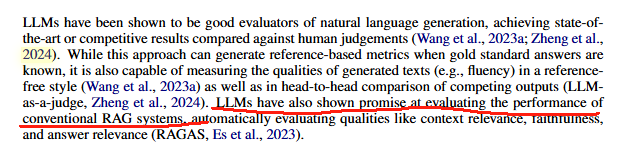
使用大模型进行评估在一篇论文中论述过,被证明是有效的:
Wang, J., Liang, Y., Meng, F., Sun, Z., Shi, H., Li, Z., Xu, J., Qu, J., and Zhou, J. (2023a). Is chatgpt
a good nlg evaluator? a preliminary study. arXiv preprint arXiv:2303.04048
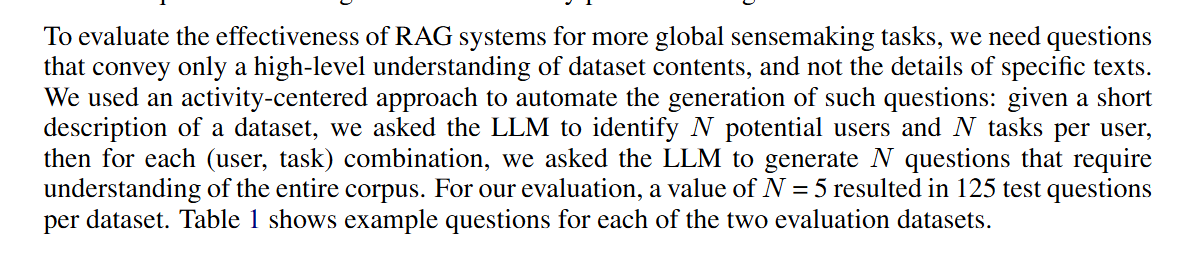
GraphRAG要求大模型根据数据集内容生成N个潜在用户,每个用户列出将使用此数据集执行的N个任务,然后,对于每个(用户、任务)组合,我们要求LLM生成N个问题,论文中N=5,也就是,针对每个数据集,一共生成125个问题。然后针对每个问题,让大模型从**Comprehensiveness 全面性,Diversity多样性,Empowerment 人类赋能**等方面评选出一个胜者,并给出原因。每个问题可以执行多次取平均。
LightRAG计算方法类似:
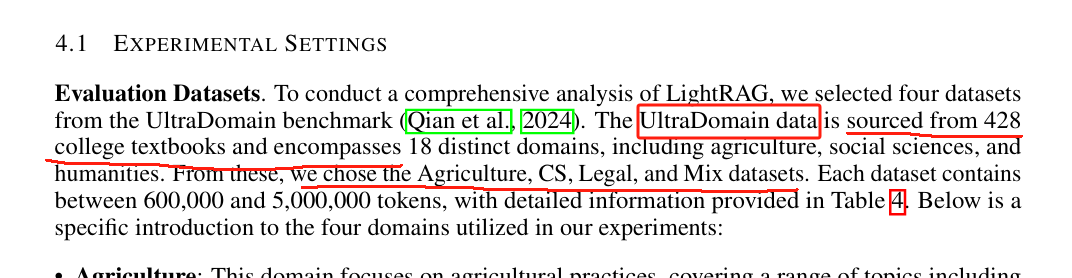
如上图所示,LightRAG评估数据集来自 UltraDomain,该数据集来源于428本大学教科书,涵盖了18个不同的领域,LightRAG论文实验中使用了四个领域的数据:农业、计算机、法律、混合。
UltraDomain数据集:https://huggingface.co/datasets/TommyChien/UltraDomain
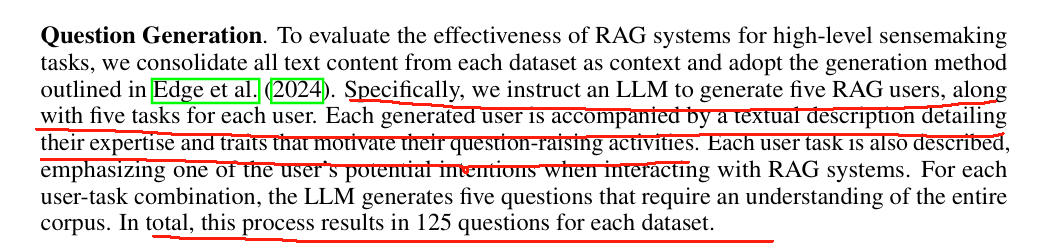
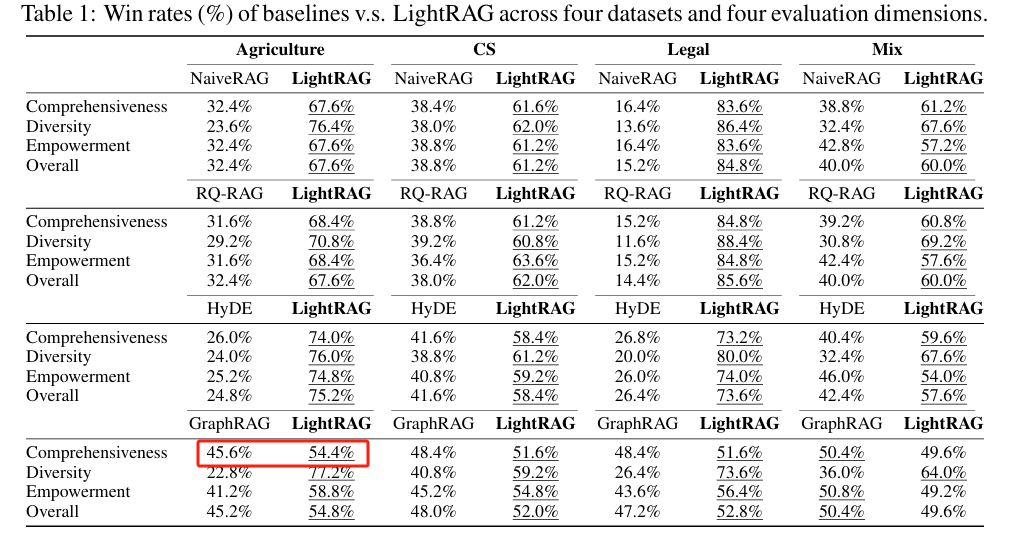
LightRAG同样是通过大模型生成问题,每个领域生成125个问题,然后让大模型从四个维度(Comprehensive、Diversity、Empowerent、Overall(整体,评估前三个标准的累积表现,确定最佳整体表现))直接比较某两个RAG系统问题回答的效果,选出胜者。最后统计胜率。如下图红框所示:两两比较胜率相加都为100%。
具体流程如下:
- 生成问题
注意:此步骤只生成问题,不生成答案
Given the following description of a dataset:

{total_description}

Please identify 5 potential users who would engage with this dataset. For each user, list 5 tasks they would perform with this dataset. Then, for each (user, task) combination, generate 5 questions that require a high-level understanding of the entire dataset.

Output the results in the following structure:
- User 1: [user description]
    - Task 1: [task description]
        - Question 1:
        - Question 2:
        - Question 3:
        - Question 4:
        - Question 5:
    - Task 2: [task description]
        ...
    - Task 5: [task description]
- User 2: [user description]
    ...
- User 5: [user description]
    ...
生成的问题如下所示、
Here are 5 potential users and their tasks with the dataset, along with 5 questions for each (user, task) combination:

**User 1: Beekeeper/Researcher**

- **Task 1: Monitor Bee Health**
    - Question 1: How does the dataset compare the prevalence of diseases like American Foulbrood and Chalkbrood across different regions and over time?
    - Question 2: Which factors (e.g., climate, forage availability, beekeeping practices) are most strongly associated with increased disease prevalence?
    - Question 3: How does the dataset compare the effectiveness of different treatments for Varroa mites across different regions?
    - Question 4: Are there any patterns in the timing of disease outbreaks that could be used to predict and prevent future outbreaks?
    - Question 5: How does the dataset compare the survival rates of honey bee colonies in different regions and over time?

- **Task 2: Analyze Forage Availability**
    - Question 1: How does the dataset quantify the availability of different forage sources (e.g., flowering plants, trees, shrubs) across different regions and over time?
    - Question 2: Which forage sources are most important for honey bee nutrition and colony health?
    - Question 3: How does the dataset compare the timing and duration of forage availability across different regions?
    - Question 4: Are there any patterns in the availability of forage sources that could be used to optimize beekeeping practices?
    - Question 5: How does the dataset compare the impact of different land management practices (e.g., agriculture, forestry, urban development) on forage availability?

- **Task 3: Study Bee Behavior**
    - Question 1: How does the dataset describe the foraging behavior of honey bees, including their preferred forage sources and foraging distances?
    - Question 2: Are there any patterns in the foraging behavior of honey bees that could be used to optimize beekeeping practices?
    - Question 3: How does the dataset compare the foraging behavior of different bee species?
    - Question 4: How does the dataset compare the foraging behavior of honey bees in different regions?
    - Question 5: How does the dataset compare the foraging behavior of honey bees over time?

- **Task 4: Analyze Beekeeping Practices**
    - Question 1: How does the dataset compare different beekeeping practices (e.g., hive management, feeding, disease control) across different regions?
    - Question 2: Which beekeeping practices are most effective for maintaining colony health and productivity?
    - Question 3: Are there any patterns in the effectiveness of different beekeeping practices that could be used to optimize beekeeping practices?
    - Question 4: How does the dataset compare the economic viability of different beekeeping practices?
    - Question 5: How does the dataset compare the sustainability of different beekeeping practices?

- **Task 5: Develop Predictive Models**
    - Question 1: Can the dataset be used to develop predictive models for honey bee colony health, disease prevalence, and forage availability?
    - Question 2: How accurate are the predictive models developed using the dataset?
    - Question 3: Can the predictive models be used to optimize beekeeping practices and improve honey bee health and productivity?
    - Question 4: Can the predictive models be used to identify potential threats to honey bee populations and develop mitigation strategies?
    - Question 5: How can the predictive models be improved and extended to other aspects of beekeeping and environmental monitoring?
- 大模型评估
---Role---
You are an expert tasked with evaluating two answers to the same question based on three criteria: **Comprehensiveness**, **Diversity**, and **Empowerment**.
---Goal---
You will evaluate two answers to the same question based on three criteria: **Comprehensiveness**, **Diversity**, and **Empowerment**.

- **Comprehensiveness**: How much detail does the answer provide to cover all aspects and details of the question?
- **Diversity**: How varied and rich is the answer in providing different perspectives and insights on the question?
- **Empowerment**: How well does the answer help the reader understand and make informed judgments about the topic?

For each criterion, choose the better answer (either Answer 1 or Answer 2) and explain why. Then, select an overall winner based on these three categories.

Here is the question:
{query}

Here are the two answers:

**Answer 1:**
{answer1}

**Answer 2:**
{answer2}

Evaluate both answers using the three criteria listed above and provide detailed explanations for each criterion.

Output your evaluation in the following JSON format:

{{
    "Comprehensiveness": {{
        "Winner": "[Answer 1 or Answer 2]",
        "Explanation": "[Provide explanation here]"
    }},
    "Empowerment": {{
        "Winner": "[Answer 1 or Answer 2]",
        "Explanation": "[Provide explanation here]"
    }},
    "Overall Winner": {{
        "Winner": "[Answer 1 or Answer 2]",
        "Explanation": "[Summarize why this answer is the overall winner based on the three criteria]"
    }}
}}